| . |
Xenophage: Alien Bloodsport |
. | |||
| . |
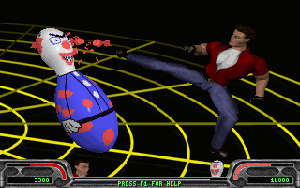
Gameplay There are three different modes to play in Xenophage: Training Mode: The best mode to begin with or to practice moves. One plays against a motionless inflatable dummy. The dummy will sway back and forth when hit and can hurt you. Although unlikely, it is possible to lose in Training Mode.
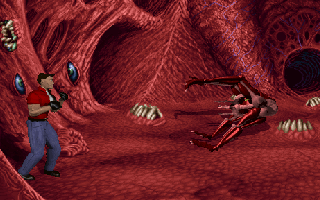
Free Play Mode: Free play mode is used when you may want to practice against a certain alien. There are many options that can be found under Match Options and Player Options to customize your fight. A human to human fight is also possible in this mode. Story Mode: Story mode is played much like a regular game. You choose a skill level and battle through all of the aliens. After beating the aliens, there are three bosses you must defeat to win the game. You have three continues (lives) in Story Mode. This mode is not available in the shareware version.
Controls You can choose to use a Keyboard, Joystick, or a Gamepad in Xenophage. Unfortunately, not all newer controllers will work since Xenophage is a DOS game with no DirectX support.
Of course, a fighting game would not be complete without special moves for each character! Xenophage includes combos, overkills, resurrections, and more. This is a good time to point out The Xenophage FAQ, written by Doug Howell, which lists all of these moves for every character. If you are serious about learning the ins and outs of how to fight, this is the place. The FAQ basically everything you would want to know about Xenophage, check it out! Read on to see what aliens you're up against. |
. |